Databases & SQL Master Course — 021. COUNT and Row Cardinality
Lesson 021 COUNT and Row Cardinality
A shop owner asks how many purchases the data contains. The answer depends on whether purchases means product lines, complete orders, or recorded ratings. Counting is simple only after the thing being counted is explicit. This lesson turns that ambiguity into three precise measurements.
Prerequisites and objectives
You should be comfortable with SELECT, WHERE, NULL tests, aliases, and DISTINCT from Lessons 001–020. No joins or grouped reports are needed.
Learning outcome: Compare COUNT star, COUNT column, and distinct counts on data containing NULLs.
By the end, you will name the input population, predict three kinds of count, and explain why a count of values can differ from a count of rows.
Start a fresh practice database
We will keep this small fixture through the aggregation sequence. Repeated order identifiers are intentional: order 100 has two product lines. Repeated scores are intentional too. Neither repetition is automatically a data error.
Run this setup once in a new, empty SQLite database. All records are fictional. Grain: one product line per line_id; orders may contain several lines. Quantity counts units; unit_price_cents is cents per unit; discount_cents is cents off the whole line, subtracted once. Rating is an optional integer score. NULL category means unclassified; NULL rating means unrecorded.
CREATE TABLE order_lines (
  line_id INTEGER PRIMARY KEY,
  order_id INTEGER NOT NULL,
  category TEXT,
  quantity INTEGER NOT NULL,
  unit_price_cents INTEGER NOT NULL,
  discount_cents INTEGER NOT NULL,
  rating INTEGER
);
INSERT INTO order_lines
  (line_id, order_id, category, quantity,
   unit_price_cents, discount_cents, rating)
VALUES
  (1,100,'Books',2,1200,100,5),
  (2,100,'Games',1,2500,0,NULL),
  (3,101,'Books',1,1800,0,4),
  (4,102,'Games',2,1500,300,5),
  (5,102,'Gifts',3,400,0,NULL),
  (6,103,'Books',1,1200,200,3),
  (7,104,'Gifts',2,600,0,4),
  (8,104,NULL,1,900,0,NULL);
Runtime and dialect: verified with SQLite 3.53.1 through Python’s standard-library sqlite3 in fresh in-memory databases. Check dialect differences before using another engine. Your client may display expected NULL values as blank cells. Use only this disposable practice database.
Step 1: say what one row means
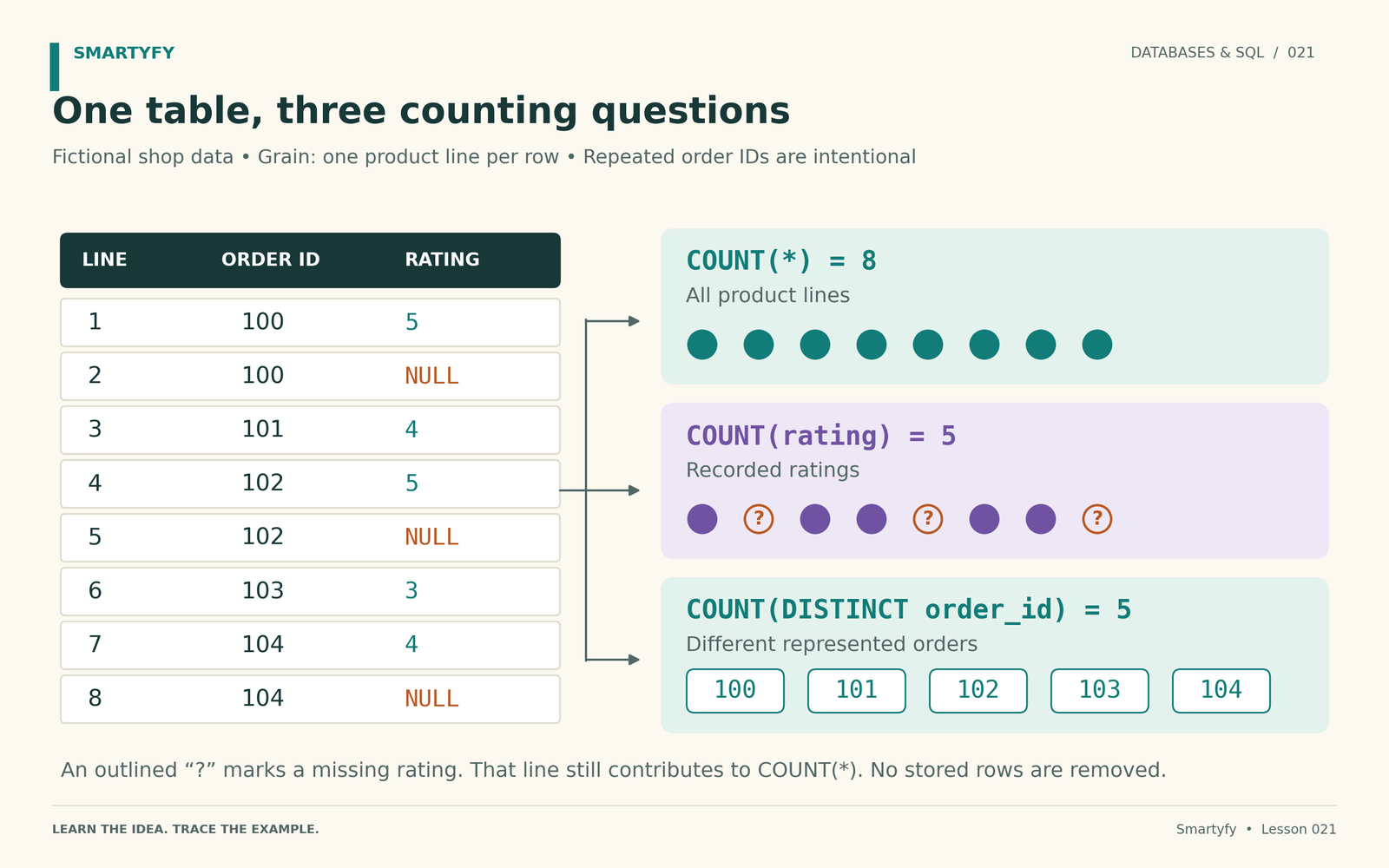
Cardinality means the number of rows in a collection. Our table has eight lines, not eight orders. Order identifiers repeat because one checkout can include several products. Establish that grain before counting.
A count summarizes its input rather than listing each record. This query produces one result row containing one number. The star inside COUNT means count rows, rather than display all columns.
SELECT COUNT(*) AS line_count FROM order_lines;Expected output: line_count = 8. All eight rows contribute, including line 8, whose category and rating are missing. The primary key identifies each contributing row.
Step 2: decide whether missing values contribute
COUNT with a column name asks how many input rows contain a nonmissing value in that column. It keeps repeated values. A recorded score of five on two different lines contributes twice to the number of recorded ratings. A missing score contributes nothing to that particular count.
Place related counts in the same result row so a reader can compare their populations. All three expressions below receive the same eight input lines. Their arguments determine what each measurement recognizes. This is a useful data-quality check before calculating any average from the recorded scores.
SELECT COUNT(*) AS lines, COUNT(category) AS classified_lines,
       COUNT(rating) AS rated_lines
FROM order_lines;
Expected output: lines = 8, classified_lines = 7, rated_lines = 5. A total of three lines lack ratings. Missing does not mean a score of zero, and an empty text value would still be a non-NULL value.
Step 3: collapse repeated identifiers deliberately
COUNT with DISTINCT inside its parentheses counts different nonmissing values. Apply it to order_id when the question concerns orders represented by these lines. Apply it to category when the question concerns known labels. The choice of column still defines the entity or attribute being measured.
The optional category on line 8 introduces an important distinction. A list made with SELECT DISTINCT can show NULL once, while a distinct count excludes NULL. Consequently, the number of displayed labels in such a list need not equal the number of known labels in this count.
SELECT COUNT(DISTINCT order_id) AS orders,
       COUNT(DISTINCT category) AS known_categories
FROM order_lines;
Expected output: orders = 5 and known_categories = 3. The orders are 100, 101, 102, 103, and 104. Books, Games, and Gifts are the three known categories; unclassified is not a fourth known value.
Step 4: filter first, then interpret the number
A WHERE condition changes the input population before counting. If you keep only Books lines, the resulting order count means orders containing a Books line in this dataset. It does not mean every order those customers have ever placed. The table has no customer column and cannot support that claim.
An empty input still produces a single summary row for the ungrouped count queries in this lesson. The count is zero. That is different from a detail query that returns no rows, so check both the value and the result shape when testing a report.
Exercise 1
Count Books product lines and the distinct orders represented by them. Predict both numbers from lines 1, 3, and 6 before running the query.
Worked answer and explanation
SELECT COUNT(*) AS book_lines, COUNT(DISTINCT order_id) AS book_orders
FROM order_lines WHERE category = 'Books';
Expected output: book_lines = 3 and book_orders = 3. The identifiers are 100, 101, and 103. Matching counts here are a property of this fixture, not a promise that line and order counts are interchangeable.
Exercise 2
Measure missing ratings directly. Return the number of unrated lines, retaining the whole line as the object being counted.
Worked answer and explanation
SELECT COUNT(*) AS unrated_lines
FROM order_lines WHERE rating IS NULL;
Expected output: unrated_lines = 3, from lines 2, 5, and 8. Filtering for missing scores and then counting rows works. Counting rating in this filtered population would count no recorded values.
Exercise 3
Compare the number of observed rating entries with the number of different observed scores. Explain how the two fives and two fours affect the result.
Worked answer and explanation
SELECT COUNT(rating) AS recorded_scores,
       COUNT(DISTINCT rating) AS different_scores
FROM order_lines;
Expected output: recorded_scores = 5 and different_scores = 3. Scores three, four, and five are present. DISTINCT removes repeated score values for this expression; it does not remove any stored product lines.
Exercise 4
Request counts for a category absent from the fixture. Check rows, recorded ratings, and distinct orders together.
Worked answer and explanation
SELECT COUNT(*) AS lines, COUNT(rating) AS ratings,
       COUNT(DISTINCT order_id) AS orders
FROM order_lines WHERE category = 'Music';
Expected output: one row with lines = 0, ratings = 0, and orders = 0. There are no matching input lines. The result does not contain a NULL count or disappear entirely.
Pitfalls and a counting checklist
Do not add DISTINCT because a number looks suspiciously large. First inspect the row meaning and repeated keys. Distinct categories counts kinds of merchandise, not sold items, and distinct prices would count price points rather than purchases.
Name the unit in every alias: “rated_lines” is clearer than “total.” State the filter alongside the result. COUNT ignores missing arguments rather than validating contents; blank labels and impossible scores need separate checks.
Knowledge check 1
Which count represents every stored product line?
- The count of all rows
- The count of recorded ratings
- The count of different orders
- The count of different categories
Answer and explanation
A. Every line contributes once to the row count, regardless of missing optional attributes. The other choices answer narrower or differently grained questions.
Knowledge check 2
Two lines have a rating of five. How do they affect the count of recorded ratings?
- They contribute zero
- They contribute one
- They contribute two
- They make the result NULL
Answer and explanation
C. Ordinary column counting preserves repeated nonmissing entries. Only a distinct count collapses the repeated score to one value.
Knowledge check 3
What does the distinct order count for Books describe?
- All customers
- Orders represented by Books lines
- All product units
- Orders containing only Books
Answer and explanation
B. The filter establishes which lines contribute. It does not prove that those orders contain no other categories; order 100 also contains Games.
Knowledge check 4
How many known categories does this fixture contain?
- Zero
- Three
- Four
- Eight
Answer and explanation
B. Books, Games, and Gifts are known labels. The missing category is excluded from the distinct count of category values.
Knowledge check 5
An ungrouped count receives no matching rows. What comes back?
- No result row
- One row containing NULL
- One row containing zero
- An error
Answer and explanation
C. The aggregate query still produces its summary row, and COUNT reports zero contributions.
Summary
Choose rows, nonmissing entries, or distinct nonmissing values before writing a count. Then specify the input filter and label the result with its real unit. These decisions make a small count auditable and prepare you to compare counts with monetary summaries.
Official references
The linked SQLite documentation was checked on 10 October 2026. The worked outputs above were independently verified against the lesson fixture.