Databases & SQL Master Course — 053. Targeted UPDATE
Lesson 053 Targeted UPDATE
UPDATE changes existing rows selected by a predicate. A small mistake in that predicate can affect a much larger population than intended, while a correct predicate paired with the wrong formula can corrupt the chosen values. This lesson rehearses targeted changes with previews, before-and-after checks, and rollback.
Prerequisites and objectives
Complete Lesson 052. You should understand WHERE, arithmetic, constraints, and generated identities. You will preview exact targets, write explicit assignments, distinguish replacing a value from incrementing it, and verify both selected and unselected rows in a disposable database.
Practice safety and transaction preview
Use only a new disposable SQLite database containing the fictional setup below. Every write demonstration starts with BEGIN and ends with ROLLBACK, so its changes are inspected and then undone. Run complete blocks on the same connection, outside any existing transaction. Detailed transaction behavior comes later; this is a controlled rehearsal, not permission to change real data.
CREATE TABLE inventory (
 item_id INTEGER PRIMARY KEY, item_name TEXT NOT NULL,
 stock INTEGER NOT NULL CHECK(stock >= 0),
 price_cents INTEGER NOT NULL CHECK(price_cents >= 0),
 active INTEGER NOT NULL CHECK(active IN (0,1))
);
INSERT INTO inventory VALUES
 (101,'Pen',4,200,1),(102,'Notebook',8,500,1),(103,'Atlas',0,1800,1);
Step 1 Define the change precisely
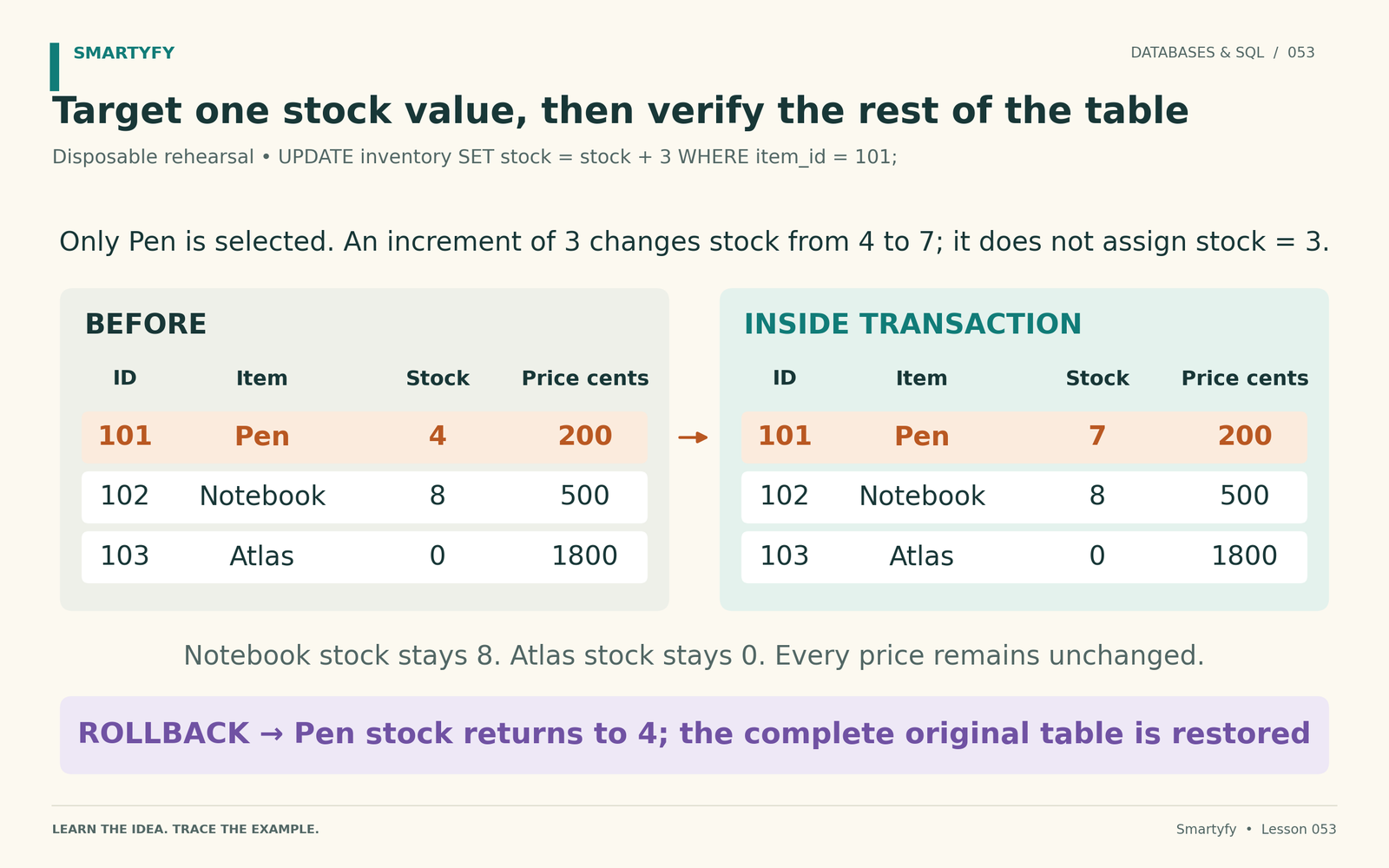
The fictional request is to add three recorded copies to item 101, Pen. That means its stock should move from four to seven. It does not mean set stock to three, change every active item, or alter prices. Write the identifier, old value, intended new value, and expected affected-row count before composing the statement.
The inventory table has three rows and constraints preventing negative stock or prices. Those constraints catch some invalid values, but they cannot determine whether a valid positive stock number belongs to the intended item. Correct targeting remains the query author’s responsibility.
Step 2 Preview the same predicate
SELECT item_id, item_name, stock FROM inventory WHERE item_id = 101;The preview identifies one row. Use the same condition in UPDATE rather than retyping a broader approximation. In a real concurrent system, a separate preview is not a permanent guarantee that data cannot change before the write; later transaction and concurrency lessons address that additional problem.
Step 3 Apply and inspect a rehearsal
BEGIN;
UPDATE inventory SET stock = stock + 3 WHERE item_id = 101;
SELECT item_id, stock, price_cents FROM inventory ORDER BY item_id;
ROLLBACK;
Pen becomes seven inside the transaction. Notebook and Atlas retain stock eight and zero, and all prices remain unchanged. ROLLBACK then returns Pen to four. Inspecting unselected rows is part of the test; checking only the changed value could miss an overbroad update.
Step 4 Distinguish assignment meanings
SET stock = 3 replaces stock with three. SET stock = stock + 3 adds three to its existing value. Both statements are valid SQL, but they implement different instructions. The column on the left names the destination, while the expression on the right supplies the new value.
Use explicit units for price changes as well. Adding 100 to price_cents adds one whole course currency unit, not one hundred whole units. Percentage changes introduce rounding and numeric-representation decisions, so this introductory fixture uses exact integer adjustments.
Step 5 Use narrow predicates
A primary-key equality is useful for a specific known item because at most one row can match. A condition such as active = 1 currently matches all three rows. That may be appropriate for a genuine bulk request, but it does not express a change to Pen alone.
Omitting WHERE would target every row in the table. Do not test that accident against real data or depend on an editor warning to prevent it. The safe workflow is a deliberate target definition, a matching SELECT preview, an expected count, and an undo-capable rehearsal in isolated practice data.
Step 6 Include an expected old value when needed
A guarded predicate can require both the item identity and the expected previous stock. If the stock no longer equals the expected value, no row matches and the change should be investigated rather than reported as successful.
BEGIN;
UPDATE inventory SET stock = 6 WHERE item_id = 101 AND stock = 4;
SELECT item_id, stock FROM inventory WHERE item_id = 101;
ROLLBACK;
This illustrates an expected-state check on the fixture. It is not a complete concurrency design by itself. Later lessons formalize version checks, transaction boundaries, and retry decisions. The important habit is to verify the outcome instead of assuming a syntactically successful statement necessarily changed a row.
Step 7 Treat constraint errors as evidence
A negative-stock assignment would violate CHECK and be rejected. Such a rejection should trigger review of the requested value or calculation, not an automatic removal of the constraint. The schema protects a stated invariant, while the application or operator must decide how to correct the input.
Likewise, a zero affected-row count can mean the identifier is absent or an expected-state condition failed. It is not automatically an error in SQL syntax. Report what the evidence establishes and keep the source state intact until the mismatch is understood.
Practice with worked solutions
Exercise 1
Rehearse increasing Notebook’s listed price by 100 cents, changing no stock value.
Worked solution
BEGIN;
UPDATE inventory SET price_cents = price_cents + 100 WHERE item_id = 102;
SELECT item_id, stock, price_cents FROM inventory ORDER BY item_id;
ROLLBACK;
Only item 102 changes price, from 500 to 600. All three stock quantities remain unchanged, confirming that the assignment touched the intended field.
Exercise 2
Set Atlas stock to five as an exact corrected count, rather than adding five to an arbitrary prior value.
Worked solution
BEGIN;
UPDATE inventory SET stock = 5 WHERE item_id = 103;
SELECT item_id, stock FROM inventory WHERE item_id = 103;
ROLLBACK;
The assignment states the final count directly. In this fixture the old value is zero, but the expression should still reflect the intended replacement rather than relying on that coincidence.
Exercise 3
Attempt the same kind of targeted update for absent item 999 and inspect the table count.
Worked solution
BEGIN;
UPDATE inventory SET stock = 5 WHERE item_id = 999;
SELECT COUNT(*) FROM inventory;
ROLLBACK;
No row matches, and no new item is created. UPDATE changes existing selected records; it does not insert an absent identity automatically.
Exercise 4
Use an incorrect expected old stock of three for Pen and verify that the guarded update does not apply.
Worked solution
BEGIN;
UPDATE inventory SET stock = 6 WHERE item_id = 101 AND stock = 3;
SELECT item_id, stock FROM inventory WHERE item_id = 101;
ROLLBACK;
Pen stays at four. The expected-state mismatch prevents this write, so a caller must investigate rather than claiming the target is now six.
Knowledge check
Question 1
What does SET stock = stock + 3 mean?
- Insert three items
- Replace stock with three
- Increase the selected stock by three
- Change the primary key
Answer and explanation
C. The right-hand expression uses the existing value to calculate the replacement.
Question 2
What happens if WHERE is omitted?
- A syntax error is guaranteed
- No rows can match
- Every row is targeted
- Only the first row changes
Answer and explanation
C. A missing restriction can affect the whole table.
Question 3
What does an update of absent item 999 do here?
- Changes zero rows
- Sets every unmatched stock value to zero
- Creates item 999
- Changes item 101
Answer and explanation
A. UPDATE does not automatically insert missing identities.
Question 4
Why inspect unselected rows?
- To generate new IDs
- To force validation of only the selected rows
- To infer update success from row order alone
- To detect unintended scope expansion
Answer and explanation
D. Correctness includes leaving unrelated records unchanged.
Question 5
What should follow an expected-state mismatch?
- Assume success
- Investigate the current state and intended change
- Remove WHERE
- Disable CHECK
Answer and explanation
B. A zero-match result needs interpretation rather than a broader automatic retry.
Pitfalls and summary
Do not confuse increments with replacements, broaden predicates to force a match, or treat constraints as obstacles to remove. Preview exact targets, predict affected rows, inspect changed and unchanged values, and undo the rehearsal. A targeted update is a verified transition between known states.
SQLite behavior and references
Examples were checked with SQLite 3.53.1 on 10 October 2026. Use a SQLite SQL editor; Python is not a prerequisite. Verify dialect-specific functions, comparison rules, and numeric behavior before moving the examples to another engine.
Primary references
- SQLite UPDATE: Assignments and WHERE-selected rows.
- SQLite CREATE TABLE: CHECK and required-value constraints.
- SQLite transactions: Inspection and rollback of controlled changes.