Databases & SQL Master Course — 006. Filtering Rows with WHERE
Lesson 006 Filtering Rows with WHERE
A list of every book is useful for inspection, but a colleague usually asks a narrower question. Which titles are available? Which title has a particular catalog number? Which prices meet a budget? WHERE expresses a condition that decides which input rows belong in the answer. This lesson builds one condition at a time so you can explain every included and excluded row.
Prerequisites and objectives
Complete Lesson 005. You should understand SELECT, FROM, column aliases, and the bookstore's row meaning. You will filter numeric and text values, distinguish selecting columns from selecting rows, test boundary values, and recognize an empty result as a possible valid answer. Python is not required.
Step 1 Start with known facts
Open a fresh empty SQLite practice database and run this setup once. Enable foreign keys before a transaction begins. The four fictional books provide positive stock, zero stock, equal prices, and several genres, giving us useful comparison cases.
PRAGMA foreign_keys = ON;
CREATE TABLE authors (
  author_id INTEGER PRIMARY KEY,
  author_name TEXT NOT NULL
);
CREATE TABLE books (
  book_id INTEGER PRIMARY KEY,
  title TEXT NOT NULL,
  author_id INTEGER NOT NULL REFERENCES authors(author_id),
  genre TEXT NOT NULL,
  price_cents INTEGER NOT NULL,
  stock INTEGER NOT NULL
);
INSERT INTO authors (author_id, author_name) VALUES
  (1, 'Mira Chen'), (2, 'Omar Silva'), (3, 'Nia Patel');
INSERT INTO books
  (book_id, title, author_id, genre, price_cents, stock) VALUES
  (101, 'River Maps', 1, 'Travel', 1800, 4),
  (102, 'SQL Trail', 2, 'Technology', 2500, 8),
  (103, 'Garden Notes', 3, 'Nature', 1200, 0),
  (104, 'Night Signals', 1, 'Fiction', 1800, 5);
Each row still represents one catalog title. A filter changes which rows appear in a result; it does not redefine the table's grain. Keep the book identifier visible during practice so you can compare your answer against the source rows without depending on titles being unique.
Step 2 Translate a condition
The request “show books with copies in stock” needs an operational definition. For this exercise it means the recorded stock value is greater than zero. It does not mean a supplier could deliver tomorrow or that no copies are reserved. Once the definition is clear, write the comparison directly.
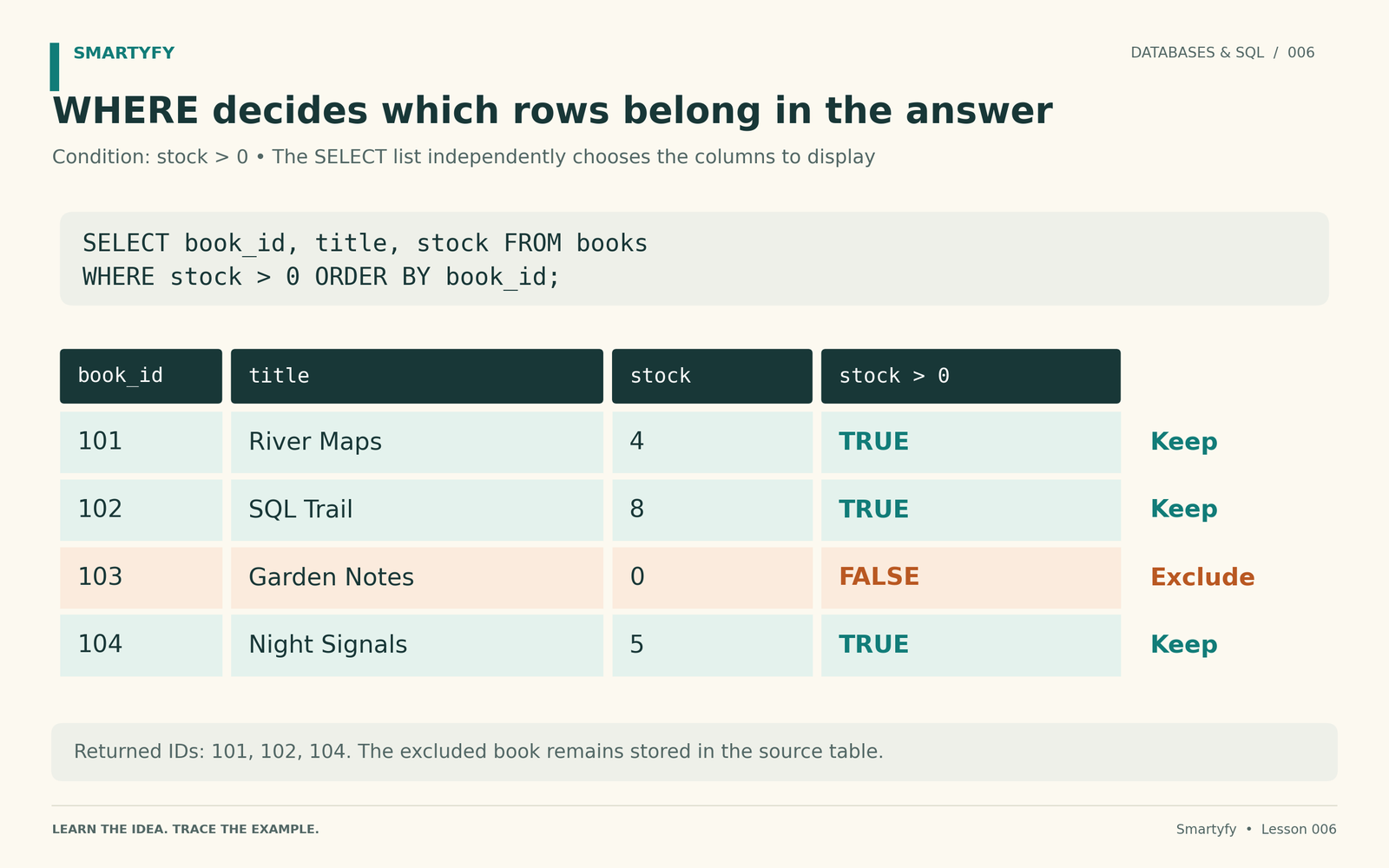
SELECT book_id, title, stock
FROM books
WHERE stock > 0
ORDER BY book_id;
The expected IDs are 101, 102, and 104, with stock values 4, 8, and 5. Garden Notes is excluded because zero is not greater than zero. SQLite tests the condition against candidate rows and retains those for which it is true. This describes the query's meaning, not a promise about the physical execution plan.
Step 3 Keep output and membership separate
The SELECT list describes the details to display. WHERE describes the row-membership rule. A column can participate in filtering without appearing in the output. If the reader only wants available titles, remove stock from the output list but keep its comparison.
SELECT title
FROM books
WHERE stock > 0
ORDER BY book_id;
The same three books survive. This distinction becomes important when reports expose only a few fields while applying several eligibility rules. Document those rules near the report so a reader does not mistake an intentionally filtered list for a complete catalog.
Step 4 Use equality and inequality precisely
Use equals for an exact requested value. In this dataset the catalog number identifies one book, so an equality filter on that number should find one row if it exists. A query can also return no rows when the requested ID is absent; that is different from a missing-table error.
SELECT book_id, title
FROM books
WHERE book_id = 102;
For text values, put the fixed value in single quotes. The column name remains an identifier. This query selects the Travel category in our fixture.
SELECT book_id, title FROM books
WHERE genre = 'Travel'
ORDER BY book_id;
The operator <> means not equal. Other comparison operators include <, <=, >, and >=. Prefer the conventional SQL equals sign rather than assuming syntax from a programming language. Text case and comparison behavior can depend on the engine and collation; use the exact fixture spelling here and study those choices later.
Step 5 Test the boundary
A budget request of “at most 18 units” includes exactly 18. Since prices are stored in hundredths, its comparison is price_cents <= 1800. “Below 18” is stricter and uses < 1800. The two books at 1800 are deliberate boundary cases, not inconvenient duplicates.
SELECT book_id, price_cents FROM books
WHERE price_cents <= 1800
ORDER BY book_id;
The expected IDs are 101, 103, and 104. Changing the operator to a strict less-than leaves only 103. A good test fixture has values on both sides of a threshold and exactly on it. Without the equal-price examples, both versions could appear correct by coincidence.
Step 6 Diagnose results deliberately
When a filter surprises you, start with an unfiltered SELECT containing the identifier and the tested column. Check units, spelling, and the boundary. Then apply one comparison and predict the matching IDs by hand. This small feedback loop is more reliable than repeatedly changing operators until a result looks plausible.
WHERE conditions can encounter NULL, which represents missing or unknown information. Ordinary comparisons involving NULL do not become true merely because a value is absent. Lesson 008 covers that behavior. Our current required columns avoid that complication so you can first master exact comparisons. Lesson 011 then combines multiple conditions.
Practice with worked solutions
Exercise 1
Find the out-of-stock title using its recorded quantity. Return the identifier and title.
Worked solution
SELECT book_id, title FROM books
WHERE stock = 0
ORDER BY book_id;
The answer is book 103, Garden Notes. Equality is appropriate because the question specifically asks for a known recorded zero, not every quantity below some reorder threshold.
Exercise 2
Return titles priced strictly above 1800 hundredths. Explain whether books priced exactly 1800 qualify.
Worked solution
SELECT book_id, title FROM books
WHERE price_cents > 1800
ORDER BY book_id;
Only SQL Trail qualifies at 2500. River Maps and Night Signals are exactly on the boundary and are excluded by the strict greater-than operator.
Exercise 3
Return every book whose genre is not Fiction. Keep the IDs in ascending order.
Worked solution
SELECT book_id, title FROM books
WHERE genre <> 'Fiction'
ORDER BY book_id;
The expected IDs are 101, 102, and 103. genre is NOT NULL in this schema, so this fixture has no unknown category requiring separate treatment.
Exercise 4
Look up book 999 and explain the expected outcome without inventing a substitute record.
Worked solution
SELECT book_id, title FROM books WHERE book_id = 999;The query succeeds with zero rows because that identifier is absent. An empty result is not evidence that the table disappeared, and the database should not guess which other book the requester intended.
Knowledge check
Question 1
Which clause chooses rows for this query?
- WHERE
- SELECT list
- AS
- The semicolon
Answer and explanation
A. WHERE applies the membership condition; the SELECT list chooses the displayed details.
Question 2
Which condition includes a price exactly equal to 1800?
- price_cents < 1800
- price_cents > 1800
- price_cents <= 1800
- price_cents <> 1800
Answer and explanation
C. Less-than-or-equal includes the boundary. The other comparisons exclude this exact value.
Question 3
Must stock appear in SELECT to filter on stock?
- Always
- Only for zero
- Only with text
- No
Answer and explanation
D. A column can determine row eligibility without becoming an output column.
Question 4
What does a successful lookup for absent ID 999 return?
- A random row
- Zero rows
- A new book
- All rows
Answer and explanation
B. No existing row satisfies the equality condition; no substitution or creation occurs.
Question 5
Which is the intended text comparison?
- genre = 'Travel'
- 'genre' = 'Travel'
- genre = Travel without a literal
- SELECT = Travel
Answer and explanation
A. genre is a column name and Travel is a fixed text literal. Quoting both as values would ask a different question.
Pitfalls and summary
Keep units explicit, test equality boundaries, and inspect the columns involved in surprising results. Filtering a SELECT does not delete excluded rows. A useful answer needs a documented eligibility rule as well as valid syntax. You can now build single-condition queries and explain both the matches and the exclusions.
Primary references
Official documentation checked on 10 October 2026.
- SQLite SELECT: WHERE filtering and result semantics.
- SQLite expressions: Comparison operators and text literals.
- SQLite data types: Comparison affinity and collation considerations.