Databases & SQL Master Course — 008. Understanding NULL
Lesson 008 Understanding NULL
Zero copies and an uncounted shelf are different facts. If you record both as zero, a report cannot distinguish “we know there are none” from “we do not know yet.” SQL NULL lets this lesson represent an unknown observation. You will learn how that state affects comparisons, calculations, and the rows a filter returns.
Prerequisites and objectives
Complete Lesson 007. You should understand WHERE, ordinary comparisons, and explicit ordering. You will identify NULL with IS NULL, select known values with IS NOT NULL, distinguish missing values from zero and empty text, and explain why ordinary equality is unsuitable for detecting NULL. No Python is required.
Step 1 Give missingness a precise meaning
This lesson uses a separate observation table instead of weakening the required stock column in our catalog. One row represents one planned stock observation for a book. observed_stock is NULL when the count has not been supplied. A zero means the count was supplied and found no copies. A note can be missing or can be an explicitly empty text value.
CREATE TABLE stock_observations (
  observation_id INTEGER PRIMARY KEY,
  book_id INTEGER NOT NULL,
  observed_stock INTEGER,
  note TEXT
);
INSERT INTO stock_observations VALUES
  (201, 101, 4, 'Shelf count'),
  (202, 102, NULL, NULL),
  (203, 103, 0, ''),
  (204, 104, 5, 'Recount');
Run that setup once in a new empty SQLite scratch database. All values are fictional. book_id connects the description to our earlier example, but this isolated teaching table does not declare a foreign key. Here we focus only on missing observations. Later schema work would decide which relationships and lifecycle rules to enforce.
Step 2 Read the four states carefully
Observation 201 records four copies and a note. Observation 202 has no supplied count and no supplied note. Observation 203 records zero copies and an empty note. Observation 204 records five copies and a recount note. An editor may display NULL as a blank, which can make it look like the empty string even though the stored states differ.
The table definition supplies the interpretation of NULL. SQL does not know whether it means not measured, not applicable, withheld, or lost in an import. If those reasons matter independently, model them explicitly instead of expecting one marker to preserve the explanation. In this exercise, its meaning is narrowly “not supplied.”
Step 3 Find unknown observations
Use IS NULL to test for the missing marker. It produces a definite true-or-false test rather than asking whether an unknown value equals another unknown value.
SELECT observation_id, book_id
FROM stock_observations
WHERE observed_stock IS NULL
ORDER BY observation_id;
Only observation 202 is returned. The question is whether a count was supplied, not how large the count is. Replacing IS NULL with = NULL would not express that question correctly.
SELECT observation_id FROM stock_observations
WHERE observed_stock = NULL
ORDER BY observation_id;
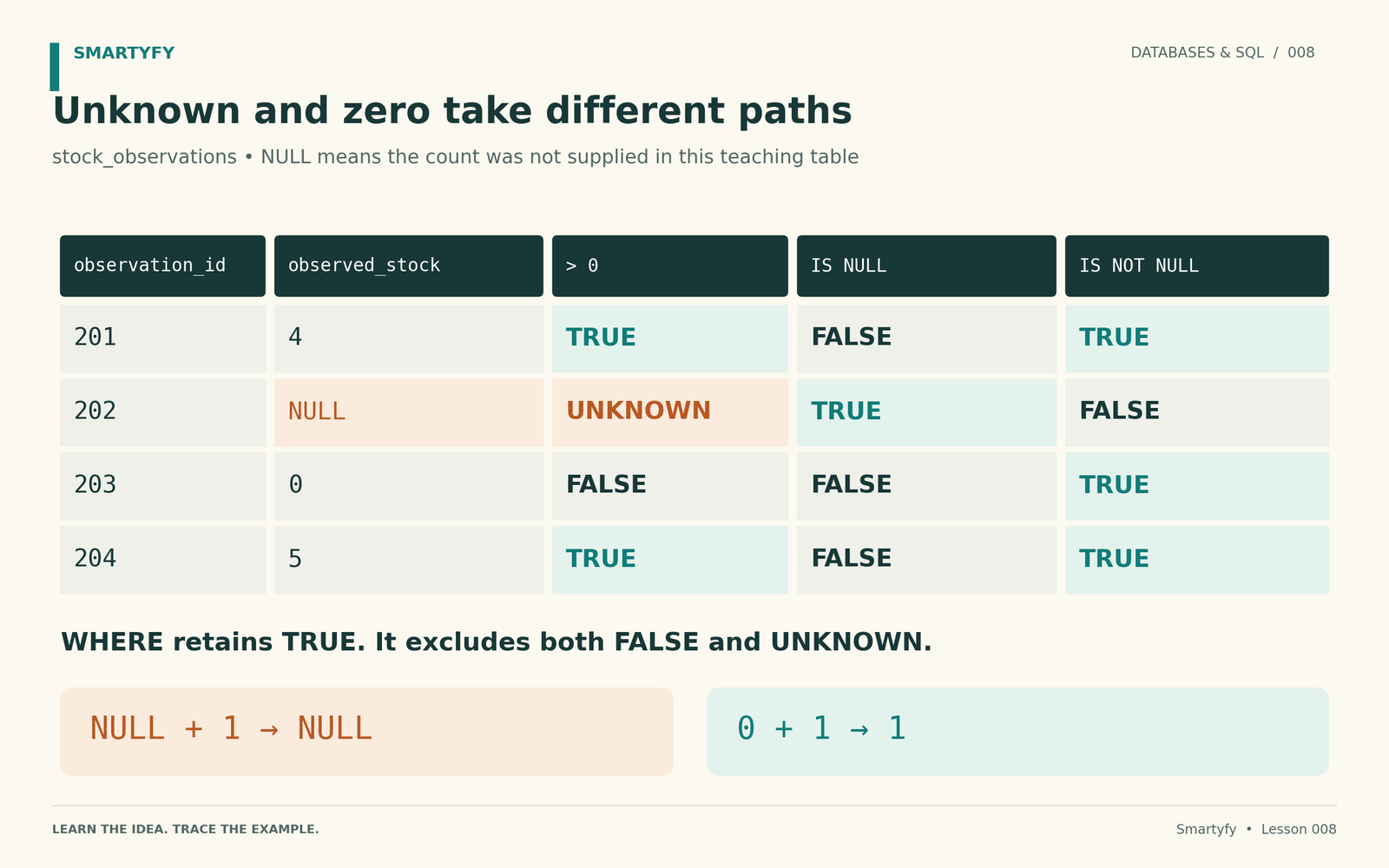
The second query returns no rows. Ordinary equality involving NULL has an unknown result in this situation. WHERE retains true conditions; it does not retain unknown ones. Therefore even the row whose observed_stock is NULL does not pass this equality test.
Step 4 Find known values without inventing them
IS NOT NULL selects the observations with supplied counts, including a known zero.
SELECT observation_id, observed_stock
FROM stock_observations
WHERE observed_stock IS NOT NULL
ORDER BY observation_id;
There are three rows, with counts 4, 0, and 5. Compare that question with observed_stock > 0, which would keep only the positive observations. “Known” and “positive” are different categories. Keeping these definitions separate prevents unknown records from quietly becoming successful measurements.
Step 5 Follow unknown results
A calculation cannot recover a missing input by wishing it known. In this example, adding one to an unknown count stays NULL. Adding one to known zero gives one.
SELECT observation_id, observed_stock + 1 AS hypothetical_stock
FROM stock_observations
ORDER BY observation_id;
The results are 5, NULL, 1, and 6. The label hypothetical_stock matters: no inventory movement has been recorded, and this SELECT does not change the stored observation. NULL propagation preserves uncertainty rather than presenting a made-up number.
A comparison such as observed_stock <> 0 also excludes the unknown row. It returns known nonzero counts, not a complete list of everything outside the known-zero category. With missing information, casually treating a predicate and its opposite as two exhaustive buckets can lose records. Later Boolean lessons show how to express several categories deliberately.
Step 6 Separate empty text from missing text
Inspect notes using a condition that matches each meaning. An empty string is written as two adjacent single quotes. It contains zero characters, but it is still a supplied text value.
SELECT observation_id FROM stock_observations
WHERE note = ''
ORDER BY observation_id;
This returns observation 203, not 202. A blank-looking grid cell is insufficient evidence about storage. Use IS NULL to find missing notes and an empty-string comparison to find supplied empty notes. Whether the application should permit an empty note is a business decision, separate from whether SQLite distinguishes these states.
Step 7 Audit before filling gaps
A tempting shortcut is to replace every missing count with zero. That would make arithmetic easier while falsely asserting that uncounted shelves were empty. First ask why the value is missing, who can provide it, and whether the report should exclude or separately label it. Defaults and later fallback functions are tools, not permission to erase uncertainty.
SQLite uses the documented NULL behavior shown here, but special equality operators, sorting defaults, and uniqueness rules can differ across engines. Use IS NULL and IS NOT NULL for these tests and verify other behavior when changing dialects. This lesson does not generalize every NULL rule from one engine to all SQL systems.
Practice with worked solutions
Exercise 1
Return the observation with a known zero count.
Worked solution
SELECT observation_id, book_id FROM stock_observations
WHERE observed_stock = 0
ORDER BY observation_id;
Observation 203 qualifies. Observation 202 is unknown rather than zero, so it must not be included in a known-empty-shelf report.
Exercise 2
Find observations whose note was not supplied.
Worked solution
SELECT observation_id FROM stock_observations
WHERE note IS NULL
ORDER BY observation_id;
Only 202 has a NULL note. The empty note on 203 is a different stored value, even if the editor displays both as blank cells.
Exercise 3
Return known nonzero counts using an ordinary comparison. Explain the absent unknown row.
Worked solution
SELECT observation_id, observed_stock FROM stock_observations
WHERE observed_stock <> 0
ORDER BY observation_id;
The result contains 201 and 204. The unknown count does not make the inequality true, so WHERE excludes it. This is not a complete complement of the known-zero category.
Exercise 4
A report claims all four observations are complete because each row exists. Give a corrected conclusion and a diagnostic query.
Worked solution
SELECT observation_id FROM stock_observations
WHERE observed_stock IS NULL;
Four observation records exist, but only three have supplied counts. Observation 202 remains incomplete. Record existence and value completeness are separate quality checks.
Knowledge check
Question 1
Which test finds an unknown count?
- observed_stock = NULL
- observed_stock IS NULL
- observed_stock = 0
- observed_stock > 0
Answer and explanation
B. IS NULL directly tests for the missing marker.
Question 2
Which statement is true about zero?
- It always means missing
- It is an empty string
- It is a known numeric value
- It cannot appear in a nullable column
Answer and explanation
C. Zero can be a valid observed quantity, independent of whether the column permits NULL.
Question 3
What is NULL + 1 in this example?
- 1
- 0
- An empty string
- NULL
Answer and explanation
D. The absent numeric input leaves this arithmetic result unknown.
Question 4
Does WHERE keep an unknown condition?
- No
- Always
- Only for integers
- Only when no row evaluates as false
Answer and explanation
A. A WHERE condition must evaluate as true for the row to survive.
Question 5
Which row has a supplied empty note?
- 201
- 202
- 203
- 204
Answer and explanation
C. Observation 203 stores empty text; observation 202 stores NULL.
Pitfalls and summary
Do not detect NULL with ordinary equality, trust blank-looking displays, or silently convert unknown measurements into zero. Document why a value may be missing and test completeness separately from record count. You can now preserve uncertainty while writing precise missing-value queries.
Primary references
Official documentation checked on 10 October 2026.
- SQLite expressions: IS NULL, comparison results, and arithmetic with NULL.
- SQLite NULL handling: Documented distinctions and compatibility context.
- SQLite SELECT: Filtering of false and NULL conditions.