Databases & SQL Master Course — 018. CAST and Type Conversion
Lesson 018 CAST and Type Conversion
Imported data often arrives as text even when it describes quantities. CAST requests a conversion, but a successful conversion is not proof that the original value was valid. This lesson separates representation changes from validation and shows why retaining raw input is essential when cleaning data.
Prerequisites and objectives
Complete Lesson 017. You should understand data types, arithmetic, NULL, aliases, sorting, and CASE. You will use CAST, compare text and numeric order, inspect storage types, recognize SQLite’s permissive conversions, and explain when converting an identifier would destroy information.
Step 1 Preserve the incoming values
Open a new empty SQLite practice database and run the fixture. quantity_text contains known-valid nonnegative integer strings. import_samples contains deliberately questionable strings. The table names keep those two populations separate so a sorting example does not imply that arbitrary imported values are clean.
CREATE TABLE quantity_text (
  row_id INTEGER PRIMARY KEY,
  raw_quantity TEXT
);
INSERT INTO quantity_text VALUES
  (1,'2'),(2,'10'),(3,'100'),(4,'003');
CREATE TABLE import_samples (
  sample_id INTEGER PRIMARY KEY,
  raw_value TEXT
);
INSERT INTO import_samples VALUES
  (1,'12.5'),(2,'12x'),(3,'apple'),(4,''),(5,NULL),(6,'1e2');
The raw columns use TEXT, preserving what the source supplied. Row 4 of quantity_text is the string 003. In a quantity field it might mean three; in a product-code field those leading zeroes could matter. The same characters can support different conversion decisions depending on the field’s meaning.
Step 2 Compare text order with numeric order
Text sorting compares representations rather than mathematical magnitude. The known-valid quantity strings therefore have an initially surprising order.
SELECT row_id, raw_quantity FROM quantity_text
ORDER BY raw_quantity, row_id;
The result is 003, 10, 100, 2. To request numeric order for these validated fixture values, cast them in the ordering expression.
SELECT row_id, raw_quantity, CAST(raw_quantity AS INTEGER) AS quantity
FROM quantity_text
ORDER BY CAST(raw_quantity AS INTEGER), row_id;
The numeric order is now 2, 3, 10, 100. The output keeps raw_quantity alongside quantity so the transformation is visible. Adding row_id as a tie-breaker makes equal converted quantities reproducible without claiming that their original strings are identical.
Step 3 Read CAST syntax
CAST takes an expression followed by AS and a target type inside parentheses. For example, CAST(raw_quantity AS INTEGER) asks SQLite for an integer representation. This is a result expression, so it does not change the stored column definition or rewrite the original text.
SQLite’s typeof function can inspect the runtime storage class of a value. It is useful for checking the actual expression result instead of guessing from how an editor displays it.
SELECT typeof('12') AS before_type,
       typeof(CAST('12' AS INTEGER)) AS after_type;
The types are text and integer. Both may look like 12 in a grid, so visual similarity is not sufficient evidence that the values have identical type behavior. Conversely, changing a type does not automatically change the business meaning of the field.
Step 4 Examine unsafe assumptions
Run a diagnostic conversion over the questionable inputs, keeping the raw strings. This deliberately demonstrates why CAST is not a general input validator.
SELECT sample_id, raw_value, CAST(raw_value AS INTEGER) AS integer_result
FROM import_samples ORDER BY sample_id;
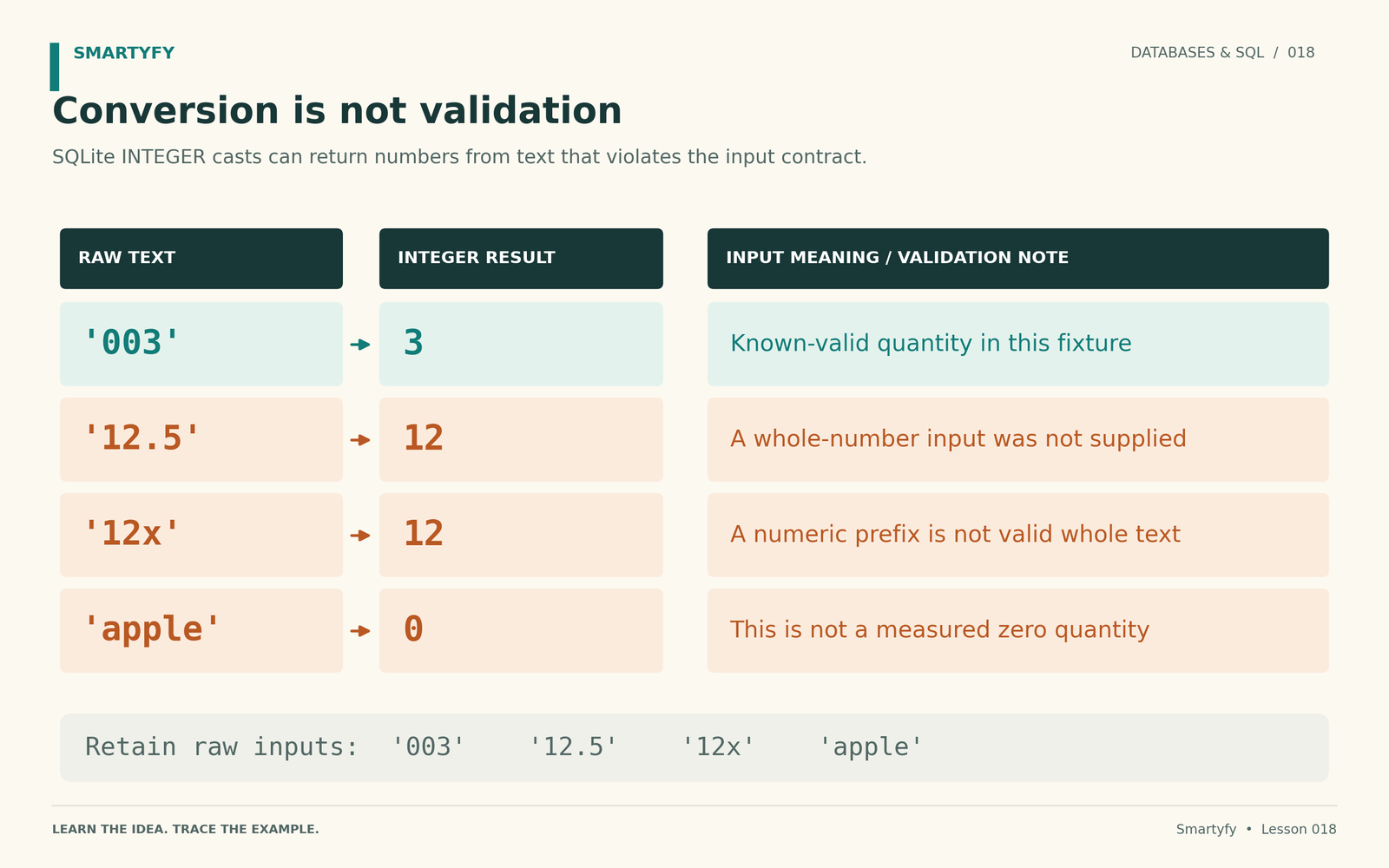
SQLite converts 12.5 and 12x to integer 12 in these cases. The nonnumeric word and empty string become zero. NULL remains NULL. Casting the exponent-looking text 1e2 directly to INTEGER gives 1, because this conversion uses its integer prefix rather than evaluating it as the real number one hundred.
These are documented SQLite behaviors, not acceptance rules for your application. If an import needs whole-number quantities, 12x is malformed even though a cast returns a number. A report that silently accepts it could overstate data quality and lose the evidence needed to repair the source.
Step 5 Choose the intended target
A real-number conversion has different behavior for decimal and exponent notation. Use a focused probe to inspect the distinction.
SELECT CAST('12.5' AS REAL) AS decimal_value,
       CAST('1e2' AS REAL) AS exponent_value,
       CAST(12.9 AS INTEGER) AS truncated;
The first two results are 12.5 and 100.0. Converting positive real 12.9 to INTEGER yields 12; it does not round to the nearest integer. If a rounding rule is required, choose and test that rule explicitly. Real arithmetic is approximate, so it is also a different representation choice from an exact integer count of hundredths.
Step 6 Build a validation workflow
A responsible import retains the original text, defines the accepted grammar and range, separates rejected records, and converts only accepted values. The grammar might permit a leading sign or decimal point, or it might require digits only. Business rules might also disallow negative quantities or impose a maximum.
This lesson does not provide a universal validation expression because those rules depend on the field. Later data-quality lessons build complete pipelines. For now, document the distinction: CAST answers “what does this engine produce when asked to convert?” Validation answers “does this input meet our stated contract?” They are different tests.
Practice with worked solutions
Exercise 1
Display the known-valid quantities as integers in ascending numeric order, retaining the row IDs.
Worked solution
SELECT row_id, CAST(raw_quantity AS INTEGER) AS quantity
FROM quantity_text
ORDER BY CAST(raw_quantity AS INTEGER), row_id;
The row IDs are 1, 4, 2, 3. The conversion is justified by the stated clean fixture, not merely by the fact that CAST executes.
Exercise 2
Convert the integer number of hundredths 1850 to whole currency units using an explicit REAL cast.
Worked solution
SELECT CAST(1850 AS REAL) / 100 AS price_units;The result is 18.5. The real-valued operand avoids integer-only division. This conversion does not by itself format the result with two decimal places or define a rounding policy.
Exercise 3
Explain why casting the product code 003 to INTEGER may be wrong. Show the two representations.
Worked solution
SELECT '003' AS product_code, CAST('003' AS INTEGER) AS converted;The text preserves leading zeroes; the integer does not. If 003 is an identifier, those characters may be part of its identity or required display. Numeric-looking text need not be a quantity.
Exercise 4
A colleague accepts apple as quantity zero because CAST returned 0. Give a safer conclusion and retain evidence.
Worked solution
SELECT sample_id, raw_value FROM import_samples
WHERE sample_id = 3;
The source is malformed for a numeric quantity and needs rejection or review under a defined contract. Keep apple as evidence; a converted zero does not establish that the source reported a known zero.
Knowledge check
Question 1
What does CAST request?
- A uniqueness rule
- A representation conversion
- A table deletion
- Guaranteed input validation
Answer and explanation
B. It asks the engine to convert an expression; validation is a separate requirement.
Question 2
Why can text 100 sort before text 2?
- One hundred is smaller
- Every sort is random
- Text order follows representation rather than numeric magnitude
- Numeric-looking text is always compared as numbers
Answer and explanation
C. The text values are compared as strings unless a suitable numeric expression is used.
Question 3
What happens to 003 when cast to INTEGER here?
- It remains three characters
- It becomes NULL
- It becomes 300
- It becomes numeric 3
Answer and explanation
D. Leading zeroes are not preserved in the integer representation.
Question 4
Does CAST apple AS INTEGER prove a valid zero?
- No
- Always
- Yes, if the conversion result is nonnegative
- Yes, if the destination column is INTEGER
Answer and explanation
A. A permissive conversion result is not evidence that the source met the quantity contract.
Question 5
What does typeof inspect?
- The label length
- A runtime storage class
- The business category
- The row count
Answer and explanation
B. It reports the kind of stored value represented by the expression in SQLite.
Pitfalls and summary
Do not overwrite raw inputs prematurely, infer validity from successful casts, or convert identifiers solely because they contain digits. Inspect both values and types, choose targets deliberately, and test malformed input. Conversion becomes trustworthy when it follows an explicit validation decision.
SQLite behavior and references
Examples were checked with SQLite 3.53.1 on 10 October 2026. Use a SQLite SQL editor; Python is not a prerequisite. Verify dialect-specific functions, comparison rules, and numeric behavior before moving the examples to another engine.
Primary references
- SQLite CAST expressions: Target-type conversion rules and numeric prefixes.
- SQLite data types: Storage classes and affinity.
- SQLite core functions: typeof diagnostics.
- SQLite floating point: Approximate real-number representation.