Databases & SQL Master Course — 063. CHECK Constraints
Lesson 063 CHECK Constraints
Prerequisites and objectives
You understand NULL, boolean expressions, required values, and uniqueness. You will encode row-local rules with CHECK, test boundary values, and recognize why an unknown expression does not reject a SQLite row. The scenario tracks how many units of a fictional parcel have been packed.
Create the practice fixture
Use a fresh disposable SQLite database. The deliberately loose sample table illustrates a missing-value gap. The parcel table has stronger rules: units are positive integers, packed units stay within the total, status is Draft or Ready, and Ready requires every unit to be packed. Each exercise rolls back after inspection.
CREATE TABLE loose_samples (
 sample_id INTEGER PRIMARY KEY,
 reading INTEGER CHECK(reading>=0)
);
CREATE TABLE parcels (
 parcel_id INTEGER PRIMARY KEY,
 units INTEGER NOT NULL CHECK(typeof(units)='integer' AND units>0),
 packed_units INTEGER NOT NULL,
 status TEXT NOT NULL CHECK(status IN ('Draft','Ready')),
 CHECK(packed_units>=0 AND packed_units<=units),
 CHECK(status<>'Ready' OR packed_units=units)
);
INSERT INTO parcels VALUES (1,5,2,'Draft');
Translate a rule into a failing case
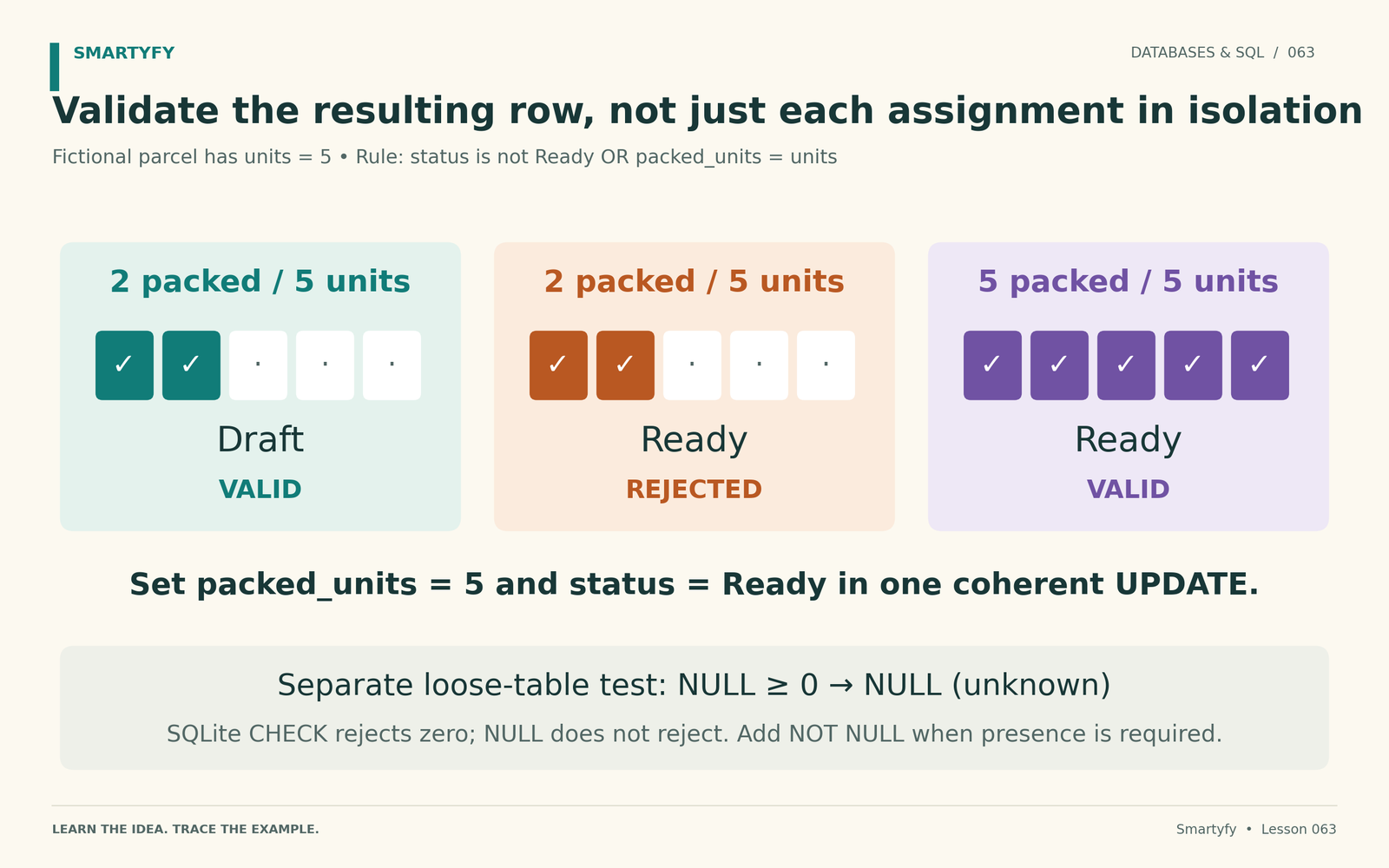
A useful CHECK rule has an understandable counterexample. Negative packed units are invalid. Packing six units into a five-unit parcel is invalid. Marking that parcel Ready when only two units are packed is invalid. Begin with these examples before compressing the requirements into boolean expressions.
The Ready rule is an implication: if status is Ready, packed units must equal total units. Its SQL form allows either a non-Ready status or equality. This lets an incompletely packed Draft exist without weakening the Ready requirement. Writing equality alone would reject every partial draft and change the workflow.
BEGIN;
UPDATE parcels SET status='Ready' WHERE parcel_id=1;
SELECT units,packed_units,status FROM parcels;
UPDATE parcels SET packed_units=5,status='Ready' WHERE parcel_id=1;
SELECT units,packed_units,status FROM parcels;
ROLLBACK;
The first update fails because two does not equal five. The second assigns both fields in one statement, so the resulting row meets every rule. This is an important design habit: validate the resulting row state, and group mutually dependent column changes so a legitimate transition does not pass through an invalid intermediate row.
Close the unknown-value gap
In SQLite a CHECK expression rejects a row when its result is zero. A NULL result does not reject it. Therefore reading greater than or equal to zero still allows a NULL reading in the loose table. Add NOT NULL when the domain requires a known reading; a comparison alone does not establish presence.
Ordinary SQLite tables also use type affinity rather than strict declared types. The units rule explicitly tests the stored type as integer. This keeps a positive-sounding text value from slipping through a numeric-looking comparison. The later STRICT-table lesson introduces another tool, but strict typing still does not replace domain checks such as positive quantity.
Keep the rule within its proper scope
A row-local CHECK can compare several columns in the same row. SQLite CHECK expressions cannot contain subqueries, so a requirement involving another table needs a different mechanism, often a foreign key for existence. A maximum total across all parcels is not the same kind of rule as packed units being no greater than units in one parcel.
Do not turn every changing business policy into a hardcoded status list without considering migration. A stable two-state teaching workflow is simple; a production status vocabulary may need a reference table and controlled transitions. Constraints should encode durable truths, with a plan for deliberate changes when the truth changes.
Test the boundary, not just an ordinary value
For a five-unit parcel, test packed values below zero, exactly zero, just below five, exactly five, and above five. Test both statuses at the equality boundary. Also test NULL and inappropriate storage types. These cases explain which part of the contract each constraint protects and reveal accidental gaps between constraints.
A rejected update does not necessarily end its outer transaction. Keep the error-handling discipline from earlier lessons: inspect the remaining state, then rollback the rehearsal. Do not disable constraint enforcement merely to make an invalid example appear successful; the failure is the evidence the exercise is designed to produce.
Four worked exercises
Exercise 1
Insert an unknown reading into the loose table and explain why it succeeds.
Worked solution
BEGIN;
INSERT INTO loose_samples VALUES (1,NULL);
SELECT sample_id,reading FROM loose_samples;
ROLLBACK;
The comparison evaluates to unknown, so this CHECK does not reject the row. If every reading must be known, declare the reading NOT NULL as a separate rule. Do not infer requiredness from a range comparison.
Exercise 2
Test a negative packed quantity and inspect the unchanged parcel.
Worked solution
BEGIN;
UPDATE parcels SET packed_units=-1 WHERE parcel_id=1;
SELECT packed_units FROM parcels;
ROLLBACK;
The lower bound rejects negative progress. The fixture still contains two packed units because the failing statement did not apply its new value. This test isolates the lower-bound rule without changing status or total quantity.
Exercise 3
Test the upper bound by attempting six packed units in the five-unit parcel.
Worked solution
BEGIN;
UPDATE parcels SET packed_units=6 WHERE parcel_id=1;
UPDATE parcels SET packed_units=0 WHERE parcel_id=1;
SELECT packed_units,status FROM parcels;
ROLLBACK;
Six fails while zero succeeds for a Draft. A lower bound and upper bound describe a closed interval here. Accepting zero is intentional because a draft may exist before packing starts.
Exercise 4
Try a nonnumeric text value for total units.
Worked solution
BEGIN;
INSERT INTO parcels VALUES (2,'many',0,'Draft');
SELECT COUNT(*) FROM parcels;
ROLLBACK;
The explicit stored-type condition rejects the text value. A declared INTEGER type in an ordinary SQLite table is not by itself the complete guarantee. This constraint is narrow: it enforces integer storage and positivity, not every possible business quantity limit.
Knowledge check
Question 1
Why can NULL pass reading>=0?
- SQLite treats every NULL comparison as true
- CHECK is not evaluated for omitted values
- INTEGER affinity converts NULL to zero
- The CHECK result is unknown rather than false
Answer and explanation
D. SQLite rejects a zero result, so requiredness needs an additional NOT NULL rule.
Question 2
Which expression represents Ready implies fully packed?
- status is Ready AND packed is less than units
- packed equals units for every status
- status is not Ready OR packed equals units
- status is Ready OR packed is negative
Answer and explanation
C. The disjunction permits drafts while requiring equality for Ready rows.
Question 3
Why update packed units and status together?
- The resulting row can satisfy both related rules
- CHECK ignores multi-column updates
- It automatically commits the transaction
- It bypasses the status constraint
Answer and explanation
A. A single coherent transition avoids an invalid intermediate state.
Question 4
Which rule belongs naturally in this row CHECK?
- A referenced supplier exists in another table
- Packed units do not exceed this parcel’s units
- Every parcel total fits a cross-table budget
- A remote shipping API has accepted the parcel
Answer and explanation
B. Comparing packed units with this parcel’s units uses only columns in the current row. The other choices depend on another table or an external system.
Question 5
What is the purpose of typeof(units) here?
- Convert nonnumeric text into an integer
- Enforce every column’s declared affinity as a strict type
- Inspect the input type before affinity conversion
- Verify the stored value is an integer
Answer and explanation
D. It complements the positive-value condition in an ordinary SQLite table.
Pitfalls and summary
Test false, true, and unknown results. Pair presence rules with content rules, express implications carefully, and distinguish row-local facts from cross-row requirements. A CHECK is useful when its accepted and rejected cases are explicit. Its name alone does not guarantee that the expression captures the intended business boundary.
SQLite behavior and references
Examples were checked with SQLite 3.53.1 on 10 October 2026. Use a SQLite SQL editor; Python is not a prerequisite. Verify dialect-specific functions, comparison rules, and numeric behavior before moving the examples to another engine.
Primary references
- SQLite CREATE TABLE: Column and table constraints
- SQLite expressions: NULL and expression evaluation