Databases & SQL Master Course — 009. Expressions and Column Aliases
Lesson 009 Expressions and Column Aliases
A query can calculate useful values without storing duplicate facts. Suppose the bookstore needs a per-title value of listed inventory, a hypothetical handling-inclusive estimate, and a readable label. These are expressions built from existing columns. This lesson focuses on units, parentheses, names, and verification so a plausible calculation does not become a misleading report.
Prerequisites and objectives
Complete Lesson 008. You should understand SELECT, aliases, basic arithmetic, WHERE, ordering, and NULL. You will build multi-part expressions, explain operator precedence, label derived values, distinguish numeric results from display text, and check calculations against hand-worked cases. No Python is required.
Step 1 Restore the known bookstore
Run the complete setup in a fresh empty SQLite practice database. Foreign keys should be enabled before any transaction starts. The records are fictional, prices use hundredths of one course currency, and stock means recorded copies.
PRAGMA foreign_keys = ON;
CREATE TABLE authors (
  author_id INTEGER PRIMARY KEY,
  author_name TEXT NOT NULL
);
CREATE TABLE books (
  book_id INTEGER PRIMARY KEY,
  title TEXT NOT NULL,
  author_id INTEGER NOT NULL REFERENCES authors(author_id),
  genre TEXT NOT NULL,
  price_cents INTEGER NOT NULL,
  stock INTEGER NOT NULL
);
INSERT INTO authors (author_id, author_name) VALUES
  (1, 'Mira Chen'), (2, 'Omar Silva'), (3, 'Nia Patel');
INSERT INTO books
  (book_id, title, author_id, genre, price_cents, stock) VALUES
  (101, 'River Maps', 1, 'Travel', 1800, 4),
  (102, 'SQL Trail', 2, 'Technology', 2500, 8),
  (103, 'Garden Notes', 3, 'Nature', 1200, 0),
  (104, 'Night Signals', 1, 'Fiction', 1800, 5);
Our earlier price conversion used one simple expression. Here we deepen the method: state the quantity, identify each input’s unit, write the expression, and verify at least one row manually. This sequence is more important than memorizing a collection of operators.
Step 2 Track the units
Multiplying price per copy by the number of copies gives a per-title listed inventory value. It is not sales revenue, profit, or acquisition cost. Those concepts would require different data and definitions.
SELECT book_id, title, price_cents * stock AS listed_value_cents
FROM books
ORDER BY book_id;
The expected values are 7200, 20000, 0, and 9000 hundredths. SQL Trail contributes 2500 per copy times eight copies, giving 20000. Garden Notes remains a row with a zero result. The calculation changes the answer’s columns, not the source table.
Step 3 Make precedence visible
The shop asks for a hypothetical estimate that adds 50 hundredths of handling per copy. First add handling to the per-copy price, then multiply by stock. Parentheses express that order.
SELECT book_id,
       (price_cents + 50) * stock AS estimate_cents,
       price_cents + 50 * stock AS different_formula
FROM books
ORDER BY book_id;
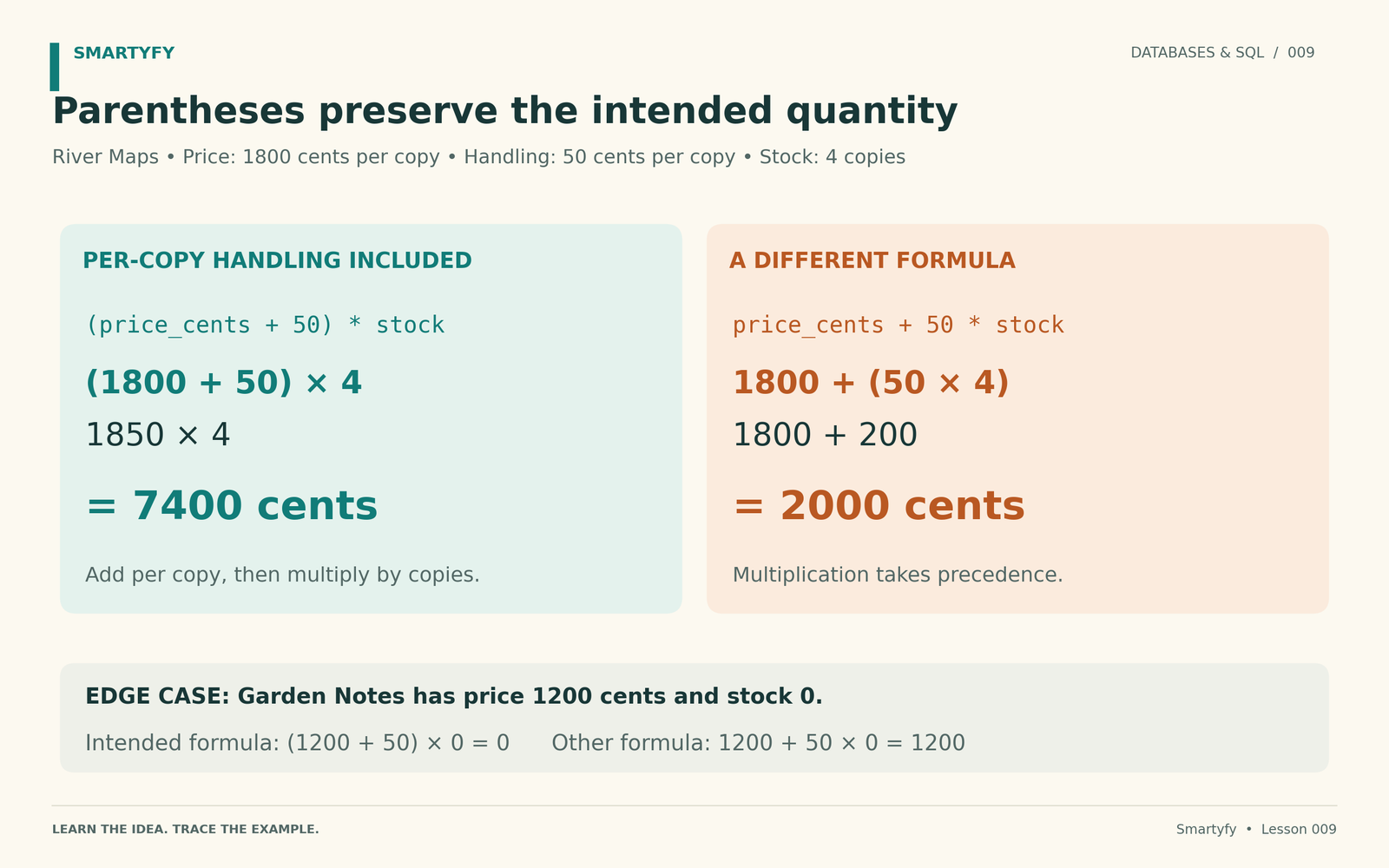
The two formulas intentionally differ. For River Maps, the intended estimate is 1850 times four, or 7400. Without parentheses, multiplication occurs before addition, producing 1800 plus 200, or 2000. That second formula combines one copy’s price with handling for four copies, which does not match the request.
For zero stock, the intended result is zero, while the other formula returns the book’s price. This makes Garden Notes a valuable edge case. When writing tests, choose rows that expose a wrong formula rather than only rows on which two formulas accidentally agree.
Step 4 Choose names that explain scope
An alias should describe what a result means and how it is measured. listed_value_cents communicates both the hypothetical valuation basis and the unit. A vague alias such as total invites confusion: total of one title, all titles, listed prices, or actual purchases?
Aliases label outputs; they do not create stored columns. For portable beginner queries, write the full expression when needed within the same SELECT list or a WHERE condition rather than assuming a sibling output alias is available there. Later lessons show how an outer query can reuse a named intermediate result. SQLite-specific conveniences should not become an undocumented portability assumption.
Step 5 Keep numbers and labels distinct
The concatenation operator || can assemble a display label in SQLite. This label combines an identifier, a separator, and a title.
SELECT book_id || ': ' || title AS catalog_label
FROM books
ORDER BY book_id;
The result is text intended for display. It does not replace the original book_id as a reliable relationship key. Titles may change, separators may appear in data, and parsing labels back into identifiers creates unnecessary ambiguity. Keep structured columns available for further processing.
Likewise, a numeric result such as 18.0 is different from a formatted price string. A calculation should preserve a numeric value when another calculation will use it. Currency symbols and two-decimal display rules belong to an explicit presentation decision. Different tools may display the same number with different trailing zeroes.
Step 6 Apply a function deliberately
A scalar function computes a result for each input row. SQLite’s length function measures characters in these ordinary text titles. It can help inspect a display constraint without modifying the text.
SELECT book_id, length(title) AS title_characters
FROM books
ORDER BY book_id;
The character counts are 10, 9, 12, and 13. Spaces count as characters. This is a text-character measure for our fixture, not a guarantee of rendered width on a screen: fonts and characters have different visual widths. The name title_characters avoids claiming more than the expression measures.
Step 7 Inspect edge cases
Integer division can discard a fractional part in SQLite, so use a real operand such as 100.0 when converting these hundredths into units. Real arithmetic can be approximate. Retain the integer-hundredths basis for exact exercise totals and do not mistake display rounding for a universally valid money calculation policy.
NULL inputs can also propagate through expressions, as Lesson 008 demonstrated. Adding a label or an alias does not make missing inputs known. These chapters use SQLite; concatenation operators, function details, alias scope, and numeric behavior need verification when porting to PostgreSQL or MySQL. Do not copy syntax solely because the business formula stays the same.
Practice with worked solutions
Exercise 1
Return each book ID and the listed inventory value in whole currency units.
Worked solution
SELECT book_id, price_cents * stock / 100.0 AS listed_value_units
FROM books
ORDER BY book_id;
The values are 72, 200, 0, and 90. Multiplication keeps the stock quantity in the calculation, and dividing by 100.0 converts hundredths to units without integer-only division.
Exercise 2
Estimate the listed value if exactly two extra copies of every title arrived, without editing stock.
Worked solution
SELECT book_id, price_cents * (stock + 2) AS hypothetical_value_cents
FROM books
ORDER BY book_id;
The values are 10800, 25000, 2400, and 12600. Parentheses add two to the copy quantity before multiplying. This is a scenario result, not evidence that stock actually arrived.
Exercise 3
Build labels in the form genre: title, keeping the original book ordering.
Worked solution
SELECT genre || ': ' || title AS genre_label
FROM books
ORDER BY book_id;
Each result combines two text fields with a fixed separator. Keep genre and title as separate stored facts; the label is a convenient output representation.
Exercise 4
A colleague calls price_cents * stock profit. Explain the problem and provide a better query label.
Worked solution
SELECT book_id, price_cents * stock AS listed_value_cents
FROM books
ORDER BY book_id;
This dataset contains listed prices and quantities, but no purchase costs or realized sales. listed_value_cents is supportable; profit is not. Correct naming is part of factual correctness, not decoration.
Knowledge check
Question 1
What do parentheses change in these expressions?
- Stored column names
- The intended evaluation grouping
- The database engine
- The row grain automatically
Answer and explanation
B. Grouping can change a formula because multiplication otherwise precedes addition.
Question 2
Which alias states a unit?
- result
- thing
- listed_value_cents
- answer
Answer and explanation
C. It identifies the measure and its hundredths-based unit.
Question 3
Does a calculated SELECT column update stock?
- Always
- Only with an alias
- Only when multiplied
- No
Answer and explanation
D. These SELECT expressions return values without changing the stored stock records.
Question 4
What is || doing in this SQLite lesson?
- Combining text
- Adding numbers
- Deleting separators
- Creating a foreign key
Answer and explanation
A. It concatenates values into the shown text labels.
Question 5
Why is a character count not a screen-width guarantee?
- Spaces never count
- Characters and fonts can have different visual widths
- Every title has the same width
- length always returns pixels
Answer and explanation
B. A text length measures characters here, while rendered width depends on presentation.
Pitfalls and summary
Do not let a familiar-looking number hide the wrong units or formula. Verify parentheses, label scope honestly, keep display strings separate from structured values, and test zero or missing inputs. Useful calculated columns are small, explainable models of a specific question.
Primary references
Official documentation checked on 10 October 2026.
- SQLite expressions: Arithmetic precedence and concatenation.
- SQLite core functions: length behavior for text.
- SQLite SELECT: Result expressions and aliases.
- SQLite floating point numbers: Limits of real-number precision.